Well, it's been a while, hasn't it? Still, hopefully you'll find that this installment was worth waiting for. By the end of this month's article, you should be able to put together a simple game. So, without further ado, let's jump straight in... 1. TILE MAPPING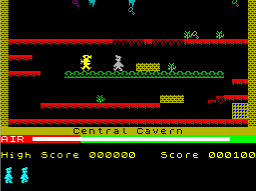 Most games take place on what is known as a 'map'. This is, generally speaking, a 2D grid of tiles that, once assembled, form a larger, coherent image. For example, if we look at this screenshot of Manic Miner we can see that the playing area is made up of blocks, each eight-by-eight pixels. But how do we get those blocks onto the screen, eh? If you're familiar with BASIC, you'll be thinking about using the plain old PRINT command. Well, that's not quite what we're going to use here. Instead, we're going to use our own custom routine. Observe:
display_tile:
| | | | ; Tile Display Routine
| | | ;
| | | ; Variables needed:
| | | ; HL - screen address to write to
| | | ; DE - graphic data to display
| | | ;
|
| | | ld b, 8 | ; Load B with number of rows
|
| | display_tile_loop:
| | | ld a,(de) | ; Load A with a byte
| | inc de | ; Shift DE to point at the next byte of graphic data
| | ld (hl), a | ; Load the current screen address with the contents of A
| | call _get_next_row | ; Shift HL to point exactly one row down
| | djnz display_tile_loop | ; If B is not zero, decrement B and loop
|
| | ret
| |
Straightforward enough, isn't it? That'll do just what PRINT does, more or less. So, all that's needed is to store an array of 8x8 pixel tile graphics, and an array for your tile map, and sort through them. Nice and simple. Off you go then. What's that? You're not sure exactly where to start? Oh, alright then, here you go... .ORG 30000
| |
| | initialise:
| | | ld hl, tmap_tilemap | ; Load the address of the tilemap into the right place.
| ld (swapaddr),hl
| | | ld hl, 16384 | ; Point HL at the screen
|
| | tilemap:
| |
| | | ld a, 0 | ; Set screen Y coordinate
| ld (swapbyte0), a
| |
| | | ld a, 16 | ; Set number of rows to draw
| ld (swapbyte1), a
| |
| | | ld a, 32 | ; Set number of columns to draw
| ld (swapbyte2), a
| |
| | tilemap_1:
| | ld bc, (swapaddr)
| | | ld a, (bc) | ; Load A with new tile
|
| | cp 0
| | | jp nz, tilemap_tile1 | ; If A is not zero, check next tile value
|
| | | ld de, _gfxtile00 | ; Point DE at tile 00
| jp tilemap_display
| |
| | tilemap_tile1:
| | cp 1
| | jp nz, tilemap_tile2
| |
| | | ld de, _gfxtile01 | ; Point DE at tile 01
| jp tilemap_display
| |
| | tilemap_tile2:
| | cp 2
| | jp nz, tilemap_hloop
| | | ld de, _gfxtile02 | ; Point DE at tile 02
| jp tilemap_display
| |
| |
| | tilemap_display:
| | push hl
| | call display_tile
| | pop hl
| |
| |
| | | tilemap_hloop: | ; Inner loop - cycle across screen
|
| | | ld a, (swapbyte2) | ; Load A with number of columns remaining
| | dec a | ; Decrement A
| | cp 0 | ; Compare A with zero
| | jp z, tilemap_vloop | ; If the comparison is true, then that was the last column -
| | | ; jump out to the vertical loop. Otherwise...
|
| | | ld (swapbyte2), a | ; Store the updated column counter
|
| | | inc hl | ; Increment screen pointer
|
| | | ld bc, (swapaddr) | ; Load BC with stored tilemap address
| | inc bc | ; Increment BC by one
| | ld (swapaddr), bc | ; Update stored tilemap address with contents of BC
|
| | | jp tilemap_1 | ; Draw next row
|
| |
| | | tilemap_vloop: | ; Outer loop - cycle down screen
|
| | | ld a, 32 | ; Reset the horizontal counter
| ld (swapbyte2), a
| |
| |
| | | ld bc, (swapaddr) | ; Load BC with stored tilemap address
| | inc bc | ; Increment BC by one
| | ld (swapaddr), bc | ; Update stored tilemap address with contents of BC
|
| | | ld a, (swapbyte0) | ; Load A with stored Y coordinate
| | add a, 8 | ; Increment A by eight (the height of one tile)
| | ld (swapbyte0), a | ; Store the updated Y coordinate
|
| | | ld c,0 | ; Set column to request
| | ld b,a | ; Set row to request
| | call get_screen_offset | ; Set HL to point at requested screen position
|
| |
| | | ld a, (swapbyte1) | ; Load A with the number of rows remaining
| | dec a | ; Decrement A
| | ld (swapbyte1), a | ; Store the updated rows counter
| | cp 0 | ; Compare A with zero
| | jp nz, tilemap_1 | ; If it's a non-zero result, there are rows remaining -
| | | ; Jump back to the start of the loop. Otherwise, it's
| | | ; all over, so we...
|
| | | ret | ; ...finally, return out of the tilemap program.
|
| |
| | display_tile:
| | | | ; Tile Display Routine
| | | ;
| | | ; Variables needed:
| | | ; HL - screen address to write to
| | | ; DE - graphic data to display
| | | ;
|
| | | ld b, 8 | ; Load B with number of rows
|
| | display_tile_loop:
| | | ld a,(de) | ; Load A with a byte
| | inc de | ; Shift DE to point at the next byte of graphic data
| | ld (hl), a | ; Load the current screen address with the contents of A
| | call _get_next_row | ; Shift HL to point exactly one row down
| | djnz display_tile_loop | ; If B is not zero, decrement B and loop
|
| | ret
| |
| | _gfxtile00
| | .db %00000000
| | .db %00000000
| | .db %00000000
| | .db %00000000
| | .db %00000000
| | .db %00000000
| | .db %00000000
| | .db %00000000
| |
| | _gfxtile01
| | .db %11111111
| | .db %11111111
| | .db %11111111
| | .db %11111111
| | .db %11111111
| | .db %11111111
| | .db %11111111
| | .db %11111111
| |
| | _gfxtile02
| | .db %10101010
| | .db %01010101
| | .db %10101010
| | .db %01010101
| | .db %10101010
| | .db %01010101
| | .db %10101010
| | .db %01010101
| |
| |
| | tmap_tilemap
| | .db 1,1,1,1, 1,1,1,1, 1,1,1,1, 1,1,1,1, 1,1,1,1, 1,1,1,1, 1,1,1,1, 1,1,1,1
| | .db 1,2,0,2, 1,2,0,2, 1,2,0,2, 1,2,0,2, 1,2,0,2, 1,2,0,2, 1,2,0,2, 1,2,0,1
| | .db 1,1,2,0, 2,1,2,0, 2,1,2,0, 2,1,2,0, 2,1,2,0, 2,1,2,0, 2,1,2,0, 2,1,2,1
| | .db 1,2,1,2, 0,2,1,2, 0,2,1,2, 0,2,1,2, 0,2,1,2, 0,2,1,2, 0,2,1,2, 0,2,1,1
| | .db 1,0,2,1, 2,0,2,1, 2,0,2,1, 2,0,2,1, 2,0,2,1, 2,0,2,1, 2,0,2,1, 2,0,2,1
| | .db 1,2,0,2, 1,2,0,2, 1,2,0,2, 1,2,0,2, 1,2,0,2, 1,2,0,2, 1,2,0,2, 1,2,0,1
| | .db 1,1,2,0, 2,1,2,0, 2,1,2,0, 2,1,2,0, 2,1,2,0, 2,1,2,0, 2,1,2,0, 2,1,2,1
| | .db 1,1,1,1, 1,1,1,1, 1,1,1,1, 1,1,1,1, 1,1,1,1, 1,1,1,1, 1,1,1,1, 1,1,1,1
| |
| | | ; A quick hack to get the address of the next row down the screen
| | ; Pass the current row address in HL, and it'll return into the same
| | ; register pair
| _get_next_row
| | inc h
| | ld a,h
| | and 7
| | ret nz
| | ld a,l
| | add a,32
| | ld l,a
| | ret c
| | ld a,h
| | sub 8
| | ld h,a
| | ret
| |
| | swapaddr
| | .dw 0
| | swapaddr2
| | .dw 0
| | swapaddr3
| | .dw 0
| |
| | swapbyte0
| | .db 0
| | swapbyte1
| | .db 0
| | swapbyte2
| | .db 0
| | swapbyte3
| | .db 0
| |
| | | ;
| | ; Pass row and column in registers b and c
| | ;
| get_screen_offset:
| | | push de | ; Store de safely on the stack
|
| | | ld de, y_lookup | ; Point DE at the start of the look-up table
| ld h, 0
| | | ld l, b | ; Load row into HL
| | add hl, hl | ; Multiply hl by two, because there are two bytes for every row
| | add hl, de | ; Add the address of table to HL
|
| | | ld e, (hl) | ; Load de with the two-byte number stored in the LUT
| | inc hl | ; (2 byte numbers are stored least-significant byte first)
| | ld d, (hl) | ;
|
| | | ld hl, 16384 | ; Load hl with the address of the screen
| | add hl, de | ; Add the offset taken from the LUT to hl
| ld d, 0
| | | ld e, c | ; Load column into de
| | add hl, de | ; Add the column to hl
|
| | | pop de | ; Retrieve de from the stack
| ret
| |
| | y_lookup:
| |
It's a bit of a long one, isn't it? (Oo-er.) It's fairly well commented, but there are a few things I'd like to add. First, note that we have two methods of pointing at the right place on the screen. While the get_screen_offset function works perfectly well, it takes nearly twice as long to run as the get_next_row function. However, it's faster to use get_screen_offset once than use get_next_row eight times to point at the right place for the next row of tiles, which is why we have both functions in there. (If there are two ways of doing something, each will usually have its place.) Secondly, note that big ol' look-up table at the end. You might think it's taking up a hefty bit of space, but it's really only 384 bytes, and it saves us a huge amount of execution time. (Look-up tables are your friends.) You can cut and paste this directly into your own code, and just modify the tile graphics and tile map. |
